
Reviews
SketchQuest: AI Art Challenge succeeds in making art accessible and fun for everyone. The AI prompts are varied enough to prevent boredom, and the scoring system provides gentle feedback without pressure. The lack of time limits is a standout feature, allowing players to focus on the creative process. It is an excellent choice for families or anyone seeking a calm, screen-based activity that stimulates visual thinking.
About This Game
AI Prompt System
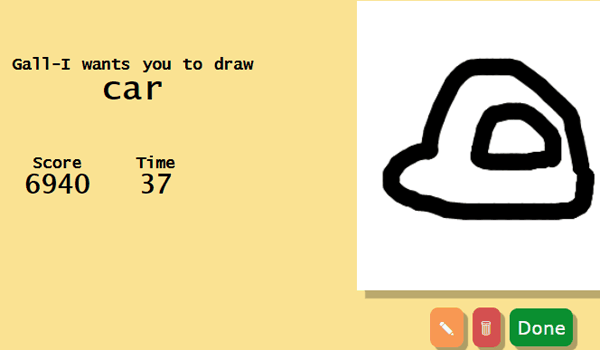
SketchQuest: AI Art Challenge centers on an AI that presents a new drawing prompt each round. Players interpret this prompt and create a sketch on a digital canvas. The AI then evaluates how closely the drawing matches the given prompt, assigning a score. This system encourages players to think about visual representation and adapt their style to meet the AI's expectations. The prompts vary widely, ensuring that no two rounds feel the same.
Drawing Tools and Interface
The game provides a set of basic drawing tools accessible via mouse or touchscreen. Players can choose brush sizes, colors, and erasers to create their artwork. The interface is designed to be intuitive, allowing even young children or those new to digital art to start drawing without confusion. The canvas is large enough for detailed work, yet the tools remain simple to avoid overwhelming users. This focus on ease of use makes the game approachable for all skill levels.
Scoring and Feedback
After each drawing, the AI delivers a score based on how well the sketch matches the prompt. This feedback is immediate and constructive, helping players understand which elements they captured effectively. Low scores do not carry any penalties, so players can experiment freely. The scoring system tracks improvement over time, offering a sense of progression without pressure. Players can choose to redraw the same prompt to try for a higher score or move on to a new challenge.
Relaxed Gameplay Loop
SketchQuest: AI Art Challenge removes common stressors like time limits or competitive rankings. Each round proceeds at the player's own pace, making it suitable for short breaks or longer creative sessions. The absence of penalties encourages risk-taking and creative expression. This design makes the game a tool for relaxation and mindfulness, as players focus solely on translating ideas into visual form. The loop of prompt, draw, score, and repeat remains engaging without causing anxiety.
Family-Friendly Environment
The game maintains a safe, family-friendly atmosphere with no inappropriate themes or content. All prompts are suitable for children and adults alike, covering everyday objects, animals, scenes, and abstract concepts. This makes SketchQuest a shared activity for parents and children, or a solo pursuit for anyone seeking a wholesome creative outlet. The positive reinforcement from the AI and the lack of failure states ensure a supportive environment for artistic growth.
Compatibility
Faq
Similar Games

Line Puzzle: Shape Challenge
SketchQuest: AI Art Challenge

Dino Color Art Studio

Style Academy Wardrobe Creator

Creative Design Hub Online
Creative Pattern Puzzles
Starlight Soirée Style Creator
Charming Pet Palette
Princess Wardrobe Seasons

Comments
0 comments